# SharePoint HTML pages: are web parts dead? (MC1479517)
> SharePoint HTML pages (MC1479517) let Copilot write a page from a prompt. Are web parts dead, what changes, what stays page-only, and what to set first.
[( Insights)](https://tenantcraft.ca/insights)
## SharePoint HTML pages: web parts aren't dead, but your intranet just changed
SharePoint is adding HTML pages that Copilot can write from a prompt. They sit beside your modern pages, run in a sandbox, and can't be switched off for the whole tenant. Here is what they replace, what they can't touch, and what to set before general availability ends in late December 2026.
Stage
Plan
Topic
SharePoint
Published
Oct 29, 2026
Written by
[Geri Crroj](https://tenantcraft.ca/about)
Tested in a live tenant, October 29, 2026
(Short version)
HTML pages are a new page type, not a replacement for web parts. Modern pages still own news, templates, co-authoring and comments. HTML pages win for one-off, designed pages with live list data. They are on by default and can't be disabled at the tenant level, so decide which sites should allow them before rollout finishes.
A project lead wants a status page. A roadmap, a few charts from the tracking list, an FAQ at the bottom. On a modern SharePoint page that means stacking web parts and living with their layouts. If they want it to look designed, they wait for someone who writes SPFx.
Soon they’ll type the request into Copilot, attach the project plan, and get a branded page back in a minute.
That’s the change in Message center post **MC1479517**, “SharePoint: HTML pages,” roadmap ID **569208**. When I read the HTML pages announcement, my first questions were: are web parts dead, what changes when Copilot can write the HTML for us, and does this change only a page or more?
Here are the answers, from Microsoft’s own documentation.
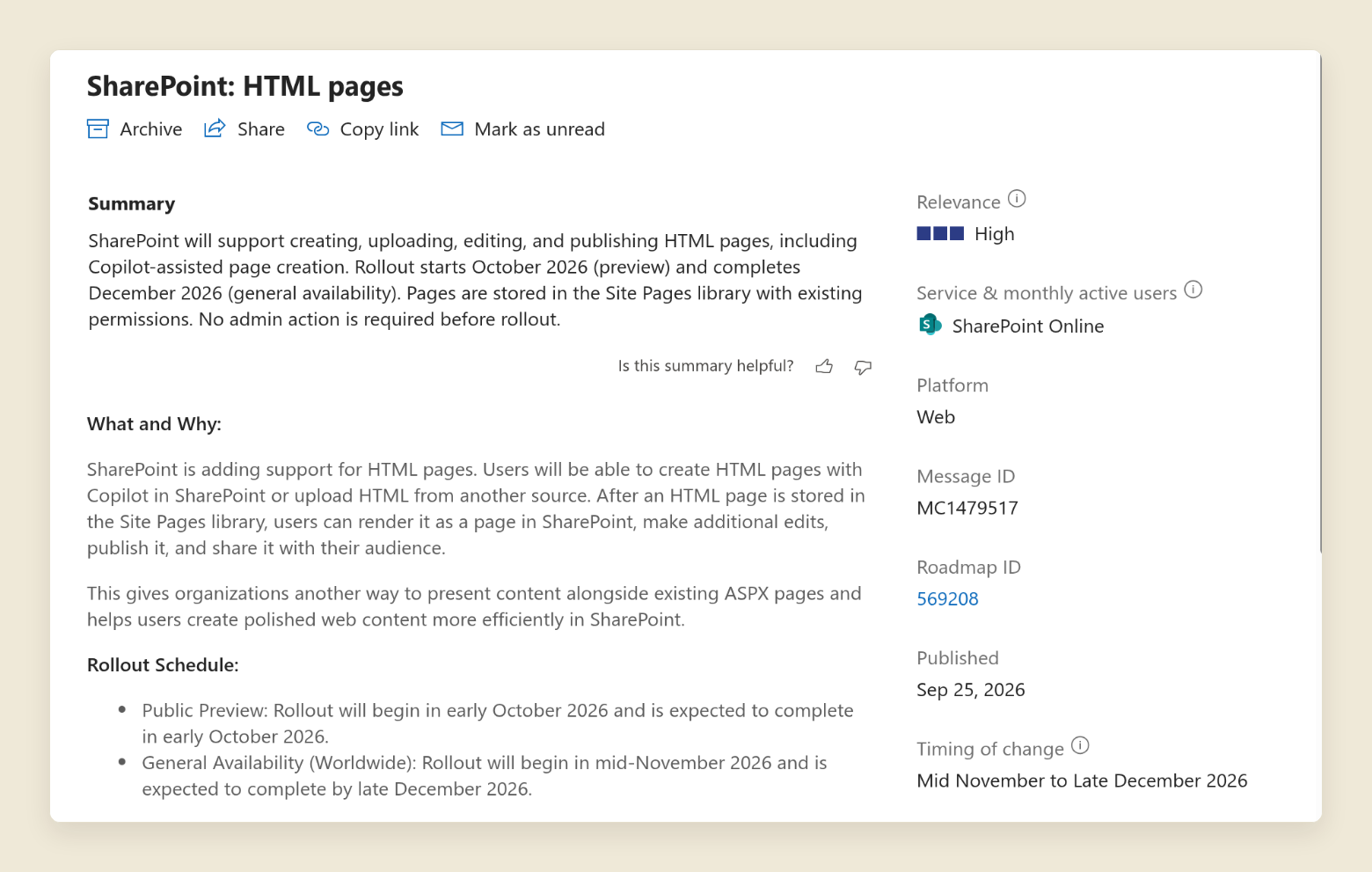
Message center > MC1479517
The announcement. No admin action is required before rollout, which is the part worth questioning.
The 5-minute version
1. **Web parts aren’t dead.** HTML pages are a new page type that sits beside modern pages. They don’t replace the web part model.
2. **Copilot writes the code.** Anyone with Copilot can describe a page and get working HTML, CSS and charts. No developer needed.
3. **It’s page-only.** The HTML runs in a sandbox inside the page. It can read your lists but can’t change navigation, other pages or settings.
4. **It’s on by default, everywhere.** Microsoft says it can’t be turned off for the whole tenant, only site by site.
5. **Uploads skip Copilot.** Anyone who can add files to Site Pages can publish a hand-written HTML page without a Copilot licence.
## Why this is a bigger deal than it looks
For years, Microsoft has been closing the door on custom code in SharePoint.
Custom script is blocked on modern sites by default, which takes the Script Editor and Content Editor web parts with it, and when an admin allows it, Microsoft’s docs say the change is “overridden to Not allowed within **24 hours**.” Then Content Security Policy enforcement started on **March 1, 2026**, with a delay possible to **June 1, 2026**, which blocks inline script in SPFx web parts.
HTML pages reopen that door, but on Microsoft’s terms. JavaScript runs again, inside a sandbox that can’t reach anything outside the page. That’s the trade: a lot of freedom on the page, nothing leaking off it.
## Are web parts dead?
No. Microsoft is still building on them. On **October 28, 2026**, it released SPFx 1.24 and made Copilot UX components generally available. The same post says that code also runs “as a web part on your pages and portals,” and that SPFx 1.25 is planned for **December 2026 or January 2027**.
What changes is which kind of page you pick for which job:
| What you need | Modern page | HTML page |
| --- | --- | --- |
| News and announcements |
News posts Promote, schedule, send to Teams
|
Not supported Can't become news or be amplified
|
| Teamwork on the page |
Co-author and comment Plus reactions and private drafts
|
Not supported No co-authoring, comments or reactions
|
| Reuse |
Page templates Same layout across sites
|
No templates Each page is its own file
|
| Design freedom |
Sections and web parts Fixed layouts
|
Any layout Your own HTML, CSS and charts
|
| Live data |
List and Excel web parts Plus SPFx for anything custom
|
Lists, Excel and CSV No outside APIs
|
| Outside systems |
SPFx web parts Can call approved APIs
|
Blocked No fetch requests or outbound calls
|
Strong on this point A limit to plan for
Use modern pages for anything that gets published on a schedule, edited by a team, or rolled out across many sites. Their layouts also got more flexible this year, as I covered in [what flexible sections can do](https://tenantcraft.ca/insights/sharepoint-flexible-sections-top-features). Use HTML pages for the one-off page that has to look good and show live numbers: a project status board, an onboarding timeline, a brand guide.
## What changes when Copilot writes the HTML
The big shift is who can build a page. Until now, a page that looked designed needed someone who could code. Now it needs someone who can describe what they want.
- **Describe it, attach a file, get a draft.** Copilot opens the page in edit mode, using your site’s branding.
- **Edit in words.** Change text on the page directly, or ask Copilot for bigger changes like “add an FAQ section at the bottom.”
- **Show live data.** Microsoft says pages can show data on refresh from SharePoint lists, Excel and CSV.
- **Charts and diagrams built in.** Chart.js, Mermaid, React, Fluent UI and **Babylon** load from a Microsoft-managed CDN.
- **Same publishing flow.** Pages keep draft and published states like modern pages. You can share them, send them as an email, and see page analytics.
Copilot is only needed for the Copilot parts. Microsoft’s table of who can do what is clear. Creating or editing with Copilot needs a Microsoft 365 Copilot licence. Uploading HTML, editing text, publishing and viewing don’t.
So the realistic picture is two groups of authors. Copilot users will generate pages. Everyone else with edit rights on Site Pages can upload HTML they wrote, or that something else wrote for them.
## Does it change only a page, or more?
Only a page. This is the part that should calm most admins down.
SharePoint renders the HTML in a sandboxed iframe, inside your site’s normal header, navigation and footer. Microsoft lists what the sandbox blocks:
- **No outside calls.** “SharePoint blocks arbitrary fetch requests and outbound API calls from HTML pages.”
- **No outside scripts.** Only code inside the same file runs, plus the five libraries above. Other CDN scripts are blocked.
- **No browser storage.** The sandbox can’t read localStorage.
- **No cross-tenant communication.**
The page can’t change your site navigation, other pages, lists or settings. It reads data, it doesn’t rewrite the site.
Two limits catch people early:
- **Links to other sites need approval.** A link to a domain outside SharePoint only opens after a site admin adds it under **HTML Field Security** in site settings.
- **Size.** An HTML file can be up to **10 MB**, not counting images and videos, which SharePoint copies to Site assets.
## The governance gap
This is the part I’d plan for now.
The Message center post says no admin action is required. That’s true, and it’s the problem. Microsoft’s announcement answers the obvious question directly. Can HTML pages be turned off for the whole tenant? “No, **not at the tenant level**.”
The only switch is per site. A site owner goes to the Site Pages library, selects **File types**, and turns **Allow HTML files** off or on. Microsoft says HTML pages are enabled by default, so every site starts with them on.
Publishing doesn’t grant new permissions, so an HTML page is only seen by people who could already see the site. But a polished, branded page that looks official is easy to mistake for a real policy or a real announcement. On a site where everyone is a Member, everyone can publish one.
There’s also a quiet trap for files you already have. If an .html file sits in a document library and someone selects **Edit in SharePoint**, SharePoint _moves_ it into Site Pages. Microsoft notes it “no longer remains in the original document library.” Any link to the old location breaks.
## Try it before your users do
General availability starts in mid-November and should finish by **late December 2026**. Before that, the feature reaches people enrolled in Microsoft’s Frontier program.
Message center post **MC1529472** says that starting in November 2026, Frontier covers public previews in SharePoint, not just Copilot. You choose who gets them. In the Microsoft 365 admin center, Microsoft points to **Copilot** > **Settings** > **View all** > **Copilot Frontier**, where the options are **No access**, **All users**, or **Specific users and groups**.
Enroll a small pilot group, usually IT and one or two content owners, and let them build a real page before everyone else can. Two details from the same post matter here:
- **Targeted release doesn’t count.** Users in Targeted release aren’t enrolled in Frontier automatically, and Targeted release retires in **January 2027**.
- **Check the All users setting.** If Frontier is already set to **All users**, every licensed person gets the previews. Switch it to specific users and groups if that isn’t what you want.
## What to do before general availability
1. **List the sites that should allow HTML pages.** Intranet home and department hubs probably should. Sites that hold policies or regulated content may not.
2. **Turn Allow HTML files off** in Site Pages on the sites that shouldn’t have them, before authors find the button.
3. **Check who can edit Site Pages** on your big sites. That’s the real list of who can publish an HTML page.
4. **Review HTML Field Security** allow lists, so links your teams need will work and links to random domains won’t.
5. **Tell authors what HTML pages are for,** with one example each: a status board yes, the leave policy no.
6. **Have the pilot group write the checklist.** They’ll find the gaps, such as a link that won’t open or a chart that needs a list column renamed, before the rest of the organization does.
## What this does not fix
- **It doesn’t replace your news process.** HTML pages can’t be news posts, scheduled, or sent to Teams and Viva Engage.
- **It doesn’t make AI pages accessible by default.** Copilot writes the HTML. Someone still has to check headings, contrast and alt text before a page goes out to everyone.
- **It doesn’t connect to your other systems.** No Jira, no outside APIs. For that you still need SPFx web parts.
- **It doesn’t give you a tenant-wide off switch.** If your governance depends on one, you’ll be managing this site by site.
## The bottom line
Web parts aren’t dead. They still run news, templates, teamwork and anything connected to outside systems. HTML pages take the designed, one-off pages that used to wait on a developer.
The real change is who can build those pages, and that it’s switched on everywhere by default. Put a pilot group on Frontier now, pick the sites that should allow HTML before late December, and turn it off on the rest.
Copilot can now publish designed pages on any site that allows HTML. The Copilot readiness guide helps you decide who can do that, and where, before rollout finishes.
Copilot Readiness Governance Checklist
PDF · 7 pages · 44 checkpoints
[Email me the PDF](https://tenantcraft.ca/resources/guides/copilot-readiness-governance)
---
_Canonical HTML: https://tenantcraft.ca/insights/sharepoint-html-pages-web-parts · Agent guide: https://tenantcraft.ca/llms.txt · Site map: https://tenantcraft.ca/sitemap-index.xml_